Restaurant online ordering system

Restaurant Online Ordering System for Local Restaurants

Give your customers a simple way to order directly from your restaurant.

BiteBuddy helps local restaurants accept direct online pickup orders through a branded ordering page, with tools for your team to receive, manage, and print orders without adding unnecessary complexity.

We built BiteBuddy to give local restaurants more choice: a practical online ordering system that is easier to start, competitively priced, and flexible enough to grow with the restaurant over time.

BiteBuddy is not a delivery marketplace, and it does not have to replace your POS. It can work alongside your current operations as a direct ordering layer for pickup orders, customer relationships, and repeat business.

Built for local restaurants

Local restaurants need one clean path from order intent to order received.

Local restaurants need more than a menu page. They need a clear path from "I want to order" to "the restaurant received my order."

BiteBuddy is built for independent restaurants, cafes, takeout shops, sushi restaurants, Chinese restaurants, bakeries, bubble tea shops, and small local food businesses that want a better direct ordering option.

Many restaurants already have loyal customers who would rather order directly. The problem is that the ordering path is often scattered across phone calls, PDF menus, old website links, social media, and third-party apps. BiteBuddy helps create one cleaner ordering flow that your restaurant can confidently share.
Ordering foundation

A useful restaurant online ordering system should do more than add an order button.

It should help customers browse your menu, choose options, select pickup details, and place an order clearly. It should also help your staff receive, review, prepare, and manage orders during real service.

The goal is not to force a restaurant into a completely new system. The goal is to add a direct ordering layer that fits the way the restaurant already works.

  • Branded online ordering page
  • Menu, options, and modifier setup
  • Pickup ordering
  • Online payment or pay-at-pickup options
  • Tablet order management
  • Receipt or kitchen printer workflow
  • Customer offers, coupons, or loyalty tools
  • Email and customer growth features
  • Analytics and conversion tracking

How BiteBuddy works

BiteBuddy connects the customer ordering experience with daily order handling.

First, your restaurant profile, menu categories, items, modifiers, pickup details, and ordering page are prepared.

Customers can then open your branded ordering page from your website, Google Business Profile, social links, QR codes, or other channels.

Your team receives incoming orders on a tablet, reviews details, manages status, and keeps the workflow clear during service.

Printer support, customer offers, email tools, loyalty, and analytics can be added as your needs grow.

Direct ordering

Start direct ordering without replacing your POS.

Many restaurants do not want to replace their POS just to start accepting better online pickup orders.

BiteBuddy can work alongside your existing restaurant operations. For many restaurants, it starts as a direct pickup ordering layer with a branded ordering page, tablet order management, and optional printer support.

That makes it easier to start small, test the workflow, and expand only when it makes sense. Over time, the same foundation can support offers, email marketing, customer loyalty, analytics, and reporting.

See how BiteBuddy works without replacing POS

Pickup workflow

Pickup ordering, tablet workflow, and printer support keep service clearer.

Pickup ordering is one of the clearest ways for restaurants to start with BiteBuddy.

Customers place the order online. Your team receives it on a tablet. Staff can review the items, accept the order, manage the status, and prepare it with clearer order details. If printer support is included, orders can also flow into a receipt or kitchen printing setup.

This helps reduce phone-order friction and gives customers a more consistent way to order when they already know what they want.

  • Customer self-service ordering
  • Clearer item and modifier details
  • Pickup time expectations
  • Staff order review
  • Receipt or kitchen printing
  • Better order visibility during service
See BiteBuddy tablet and printer setup

Customer growth

Direct ordering should not stop at the first order.

BiteBuddy can support customer offers, coupons, welcome offers, email collection, win-back campaigns, and loyalty or rewards-style programs depending on the setup.

The goal is not to overwhelm restaurants with marketing tools from day one. The goal is to build a simple ordering foundation that can later grow into stronger customer relationships.

  • First-order offers
  • Limited-time coupons
  • Customer email collection
  • Win-back emails
  • Repeat customer promotions
  • Loyalty or rewards extensions
See BiteBuddy loyalty and email tools

Analytics

A restaurant online ordering system should help you understand more than page views.

BiteBuddy can support visibility into ordering activity, customer actions, offer usage, and conversion-related events. This gives restaurants a clearer way to see whether the ordering path is working and where improvements may be needed.

Analytics should help restaurants make better decisions without forcing the team to live inside a dashboard.

  • Ordering page visits
  • Menu and item engagement
  • Checkout or order-start signals
  • Completed order signals
  • Offer or coupon use
  • Email signup activity
  • Contact or demo events
  • Future reporting and analytics

Features included

The core pieces needed to accept and manage direct online orders.

The exact setup depends on your menu, payment needs, pickup workflow, and how your team currently handles orders.

  • Branded restaurant ordering page
  • Restaurant profile and menu setup
  • Menu categories, items, options, and modifiers
  • Pickup ordering configuration
  • Online payment or pay-at-pickup options
  • Tablet order dashboard
  • Order status management
  • Thermal printer workflow
  • Coupons and customer offers
  • Email CRM and customer growth tools
  • Analytics and conversion tracking
  • Staging and production ordering environments

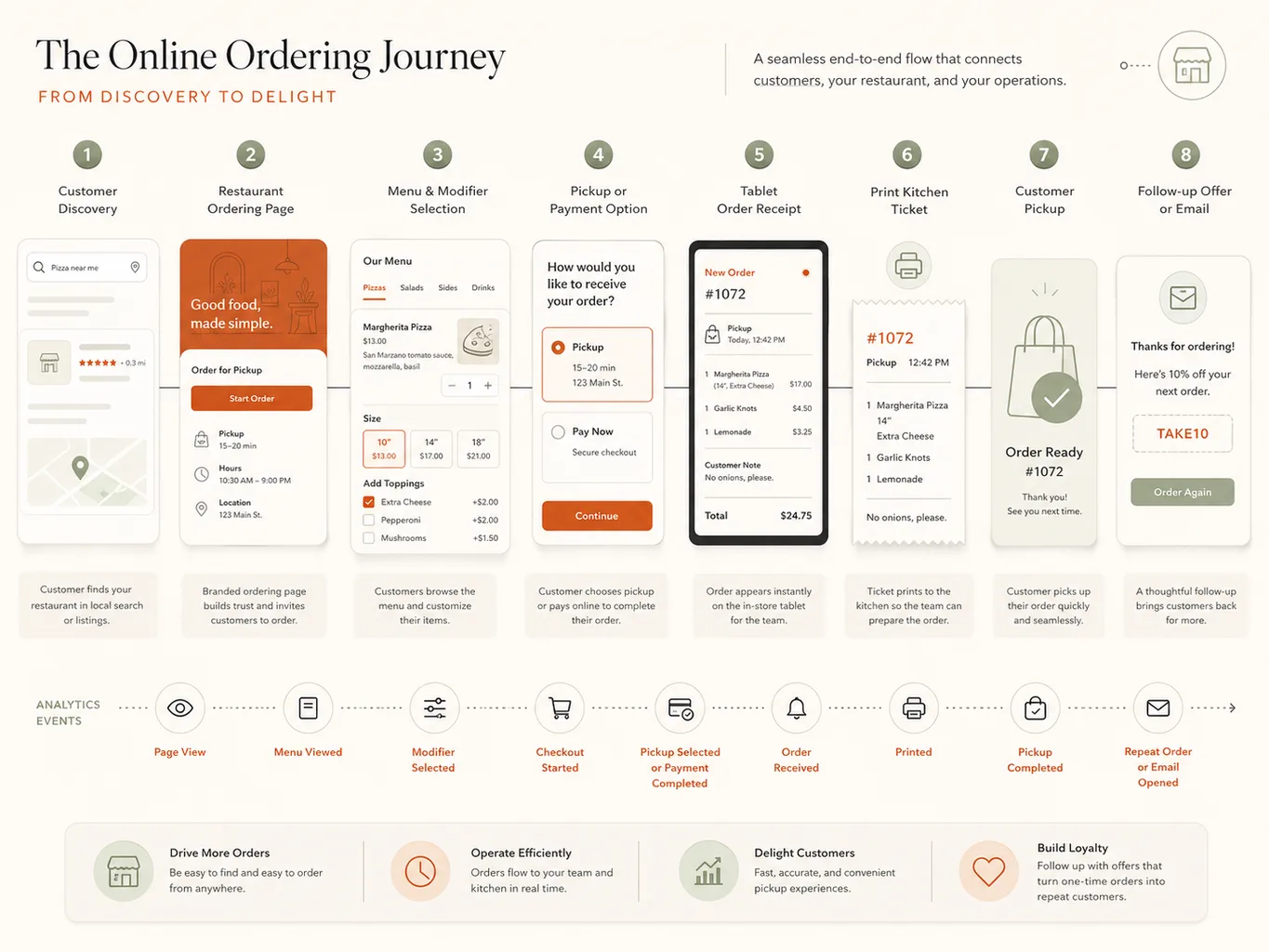
Example ordering flow

The customer experience, staff workflow, and follow-up path should work together.

A simple direct pickup ordering flow may look like this:

This is the difference between having an order link and having an ordering system. The customer experience, staff workflow, and future follow-up all work together.

Restaurant pickup ordering workflow from customer order to tablet, printer, pickup, and follow-up offer
  1. A customer finds your restaurant through search, maps, social media, or your website.
  2. The customer opens your BiteBuddy ordering page.
  3. They browse your menu, choose items, and select options.
  4. They choose pickup details and a payment option.
  5. Your restaurant receives the order on a tablet.
  6. The order is reviewed, prepared, and printed if needed.
  7. The customer picks up the order.
  8. Your restaurant can follow up later with offers or customer growth tools.

Setup process

A practical setup process from menu review to launch testing.

The goal is to launch with a workflow that customers can use and staff can operate during real service.

  1. 01

    Restaurant and Menu Review

    We start by reviewing your restaurant type, menu structure, pickup workflow, modifiers, payment needs, and how orders are currently handled.

  2. 02

    Ordering Page Setup

    Your branded ordering page is prepared with restaurant details, menu categories, items, photos if available, options, modifiers, and pickup information.

  3. 03

    Payment and Pickup Settings

    Online payment, pay-at-pickup, pickup timing, taxes, fees, and order rules are configured based on your restaurant's needs.

  4. 04

    Tablet and Printer Configuration

    The order management workflow is prepared so staff can receive and manage orders. If printer support is included, the printer workflow is configured and tested.

  5. 05

    Test Order and Launch

    Before launch, test orders are placed from the customer side and reviewed from the restaurant side. The ordering page, tablet workflow, printer behavior, payment settings, and order notifications are checked before going live.

FAQ

Questions business owners often ask before starting.

Is BiteBuddy a delivery marketplace?

No. BiteBuddy is positioned as a direct online ordering layer for restaurants, especially pickup orders. It is not meant to replace every delivery marketplace relationship.

Does BiteBuddy have to replace our POS?

No. For many restaurants, BiteBuddy can work alongside the current operation as a direct pickup ordering layer with tablet order management and optional printer support.

Can customers pay online or pay at pickup?

The setup can support online payment or pay-at-pickup options depending on the restaurant's needs, payment setup, and operating workflow.

Can orders print in the kitchen?

Printer support can be included when it fits the workflow. The printer behavior should be tested with real order examples before launch.

Can BiteBuddy help with coupons or customer offers?

Yes. Customer offers, coupons, email collection, loyalty-style extensions, and win-back campaigns can be planned as part of the direct ordering foundation or added later.

Can we start small?

Yes. A practical starting point is often a branded ordering page, pickup ordering, tablet order management, and a tested launch workflow. Additional growth tools can be added when the restaurant is ready.

Can this connect with our restaurant website?

Yes. The ordering page can be linked from your website, Google Business Profile, social profiles, QR codes, and other customer touchpoints.

See restaurant website design

Ready when you are

Start direct pickup ordering with a workflow your team can actually use.

If your restaurant needs a clearer way to accept direct pickup orders, manage orders on a tablet, and build stronger customer relationships over time, start with BiteBuddy online ordering.